

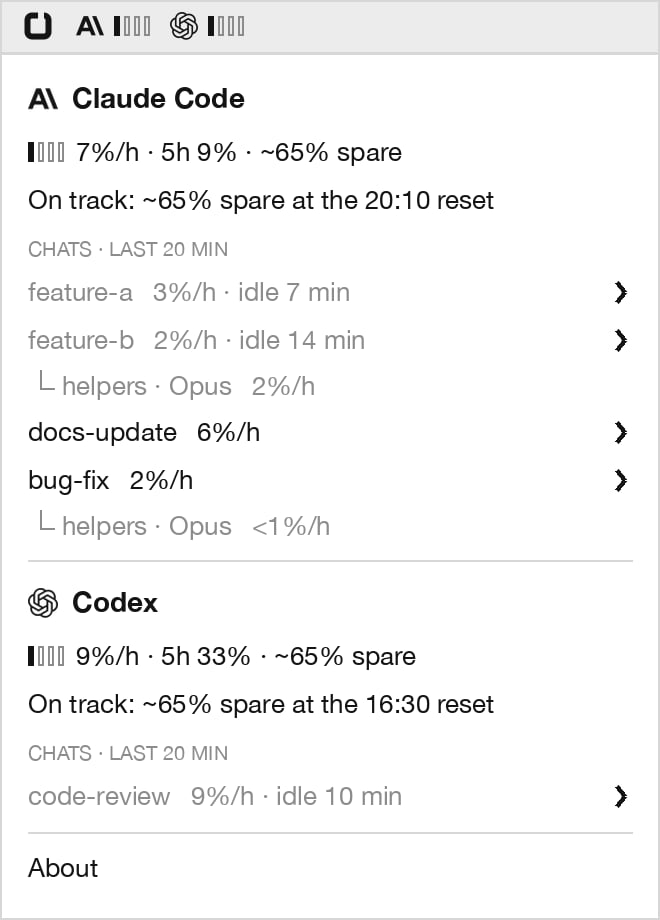
The coach in the macOS menu bar: Claude Code and Codex, each with its pace, verdict and busiest chats.
- The macOS menu bar, for Claude Code and Codex side by side. See The menu bar.
- A line under your Claude Code prompt, which also warns you before an expensive send. See Claude Code. Codex has no status line the coach can use, so Codex is in the menu bar only.
The coach is in testing. It runs on macOS, it is off until you turn it on, and everything it records stays on your Mac.
Why it exists
Claude and ChatGPT plans both limit how much you can use in any 5-hour window. Claude Code and Codex show the percentage you have used, but a percentage does not tell you whether you will make it to the reset. You find out when you hit the limit, usually in the middle of something. If you use both tools, you are watching two separate limits that move at different speeds. The coach answers that question ahead of time, for each tool. It also shows which of your habits are spending the limit, so that slowing down means changing one specific thing and not just using the tool less.Requirements
You can use either tool alone. The menu bar shows a section for each tool you use.
Install
Update or-otel
✓ installed or-otel 0.13.0 or a newer version.Turn the coach on
menu line says not set up, see Troubleshooting.Check both tools
Menu bar. The coach’s item appears right away. A tool shows
— until it has spent something in the last 20 minutes, so use Claude Code or Codex for a few minutes and its bars fill in.Codex. Nothing to restart. Sessions that are already open are picked up.Claude Code. Open a new session to see the line; sessions that were already open keep their old settings. If you have a status line of your own, yours stays first and the coach line goes below it.For the first five minutes of a 5-hour window, each tool reads checking pace…. The coach needs a few minutes of readings before it can project anything.How to read the coach
Both tools use the same three ideas: a verdict, a pace, and a top drain.The verdict
The verdict says whether a tool’s limit lasts to its reset at your current pace. It covers your whole account for that tool, not only one chat.
Spare is the share of the limit you would have left at the reset. It is rounded to the nearest 5% when it is above 10%.
The verdict keeps moving while you are idle. Minutes with no usage push the run-out time later, so a red verdict turns green if you stop for a while.
The pace bar
The pace bar compares how fast you are spending with the pace that would land exactly on the reset.
The number next to the bars is the rate in percent of the 5-hour limit per hour (%/h). A full window is on pace at 20%/h, since 100% over five hours is 20% each hour. The pace that counts as “on pace” changes during the window: if you have 30% left and one hour to go, 30%/h is on pace.
Every number the coach shows is in %/h, so chats, helpers and parts can be compared with each other and with the tool’s total.
The top drain
When a verdict is amber or red, the coach names the biggest spender over the last 20 minutes: the chat, the largest part of that chat’s spending, and how fast that part alone is spending the limit. For example,browser 28%/h on a tool running at 48%/h means browser results account for 28 of the 48.
The parts differ by tool, because the tools spend their limits differently. See Claude Code and Codex.
When a tool’s limit rises by more than its chats on this Mac explain, the coach says so: outside Claude Code or Outside Codex. That is usage it cannot see, such as claude.ai, Claude Desktop, Codex cloud tasks, or either tool on another machine.
The menu bar
The menu bar item shows both tools at once, each against its own limit.
Both tools under pace: Claude Code at two bars, Codex at one.

Both tools red. Only the earlier run-out time shows, struck through.
—.
When a tool’s verdict is red, its run-out time follows its bars, in red and struck through, in 24-hour time. If both are red, only the earlier time shows, to keep the title short.
Click the item to open the details. Claude Code and Codex each get the same section. When a tool is red, its section also names the top drain:
Claude Code
Claude Code shows in the menu bar and also in a line under your prompt.The status line
The verdict and the pace bar can disagree, and that is useful. A red verdict with one or two pace bars means something else is spending your limit, not this chat.
How a chat’s pace is measured
The bar appears from the chat’s first prompt. The coach measures the chat’s rate two ways over the last 20 minutes and shows the higher one:- Per prompt. Once the chat has three prompts in the last 20 minutes: what each prompt cost, over the usual time between prompts.
- By time. What the chat spent in the last 20 minutes, over the time since its first prompt in that stretch (at least five minutes). This includes the turn that is still running and any helpers it started.
What Claude Code spends on
Re-reading the chat on each request costs nothing toward the Claude limit, as long as the chat is still kept ready for reuse. That is why
chat reload is a part and an ordinary long chat is not.
The big result note
After a turn that brought one very large result into the chat (more than about 10,000 tokens), the line adds a note for one turn:Warnings before an expensive send
Claude re-reads the whole chat on every request. Normally that is nearly free, because the chat so far is kept ready for reuse for about an hour after your last message. Two things throw that away, and then the next request pays to send the whole chat again:- Coming back after a break. If a large chat has been idle for about an hour, the next send reloads it.
- Switching model. The new model has nothing ready for this chat, so the next send resends it.
would run out 1:50pmmeans that after paying this cost, your current pace runs out before the reset.still on trackmeans you can afford it.
Codex
Codex shows in the menu bar, with the same pace bars, verdict, top drain and chat list as Claude Code. The coach reads the session files Codex already writes on your Mac. It adds nothing to Codex and changes nothing in it.How a chat’s pace is measured
A Codex chat’s rate is by time: what it spent in the last 20 minutes, over the time since its first request in that stretch (at least five minutes). Codex’s files do not mark prompts in a way the coach can count, so there is no per-prompt rate. A long Codex task shows from its first minute, the same as a long Claude Code prompt. Helpers that a Codex chat starts are listed under it with their task and nickname, for example└ write tests · sol.
What Codex spends on
long chat is the main difference from Claude Code, where re-reading a chat that is kept ready costs nothing. On Codex a long chat is a steady cost, not a one-off.
Cold resumes
When you return to a large Codex chat (over 100,000 tokens) after more than six hours, its first request reads most of it in again. The coach books that request aschat reload, and the chat’s details in the menu show resumed cold, cost ≈N% for as long as it is in the 20-minute window.
What to do when a tool is amber or red
The top drain tells you where to look. Claude Code
Codex
Both
Taking a short break also works. The projection is based on your recent pace, so ten idle minutes move the run-out time later.
How it works
The coach uses only what Claude Code and Codex already have on your Mac.For both tools
- Your limit. Each tool reports the percentage of its 5-hour limit you have used, and its reset time. The coach records each time that percentage rises. Every open session of a tool contributes to one record, because the limit belongs to your account.
- Your rate. The run-out time is the limit you have left divided by how fast it rose over the last 20 minutes.
- Between readings. The percentage only moves in whole numbers. To stop the projection jumping at each step, the coach estimates what each request cost from its token counts, using weights measured per model, and adds the requests since the last whole-number step. It rescales those estimates by how your own limit actually moves.
- Where it went. It splits each request’s cost into the parts listed for each tool, and adds them up per chat.
Claude Code
Claude Code passes the limit to its status line, and the coach records it from there. To see each turn, the coach adds four hooks to Claude Code. A hook is a command Claude Code runs at a fixed moment.
The hooks print nothing and never stop a turn. If one fails, it exits quietly and Claude Code carries on.
A turn is booked when it finishes. While it runs, the status line and the menu bar read the same transcript without writing anything, so a running turn and its helpers count from their first minute. Helpers, the model and the answer text are read exactly from the transcript. Tool results (browser, images, big reads) and chat reloads are estimated from their size.
Codex
Codex writes every session to~/.codex/sessions, including the tokens each request used and the limit as Codex reports it. The coach reads those files every five seconds, picking up where it left off, and never writes to them. It adds no hooks and installs nothing into Codex.
Each request is priced with weights measured per Codex model, with the re-read part of the chat charged at its lower rate.
Accuracy and limits
Treat the coach as an estimate, the way you treat a car’s range. Both tools- It follows your recent pace. If you change what you are doing, the projection takes up to 20 minutes to catch up fully.
- The first five minutes of a window are blank. One early step in the percentage would otherwise read as a very high rate.
- Costs and top-drain rates depend on per-model weights measured on one account. On a different plan they may be somewhat off until the coach has seen your limit rise a few times and adjusted to it. The verdict itself is built from your own limit readings and does not depend on those weights.
- It only sees this Mac. Usage in claude.ai, Claude Desktop, Codex cloud tasks or on another machine moves your limit but has no detail. The coach reports it as
outside Claude CodeorOutside Codex. - It covers the 5-hour limit only. It does not project the weekly limit.
- The menu bar is drawn for a dark menu bar. On a light menu bar the marks and bars are hard to read.
- Tool results are underestimated. A browser or file result is priced by its size alone, so a rate such as
browser 28%/his a floor. The text Claude writes while working with those results is counted underlong answers. - Messages you queue while Claude is working count as one turn. Claude Code delivers them together.
- No status line and no send warnings. Codex is in the menu bar only.
- A model without measured weights is priced as the default model. Its chat’s details say
priced asand name the model used instead. - Large tool results are not split out. They are counted in
long chatonce they are part of the chat.
What it puts on your Mac
The coach notes what it set up in
~/.openreason/coach/swiftbar-*, so that off and uninstall undo only that.
Your Claude Code status line command stays or-otel statusline. It prints your own status line first, if you have one, and then the coach line.
Nothing the coach records is sent anywhere. It makes no network requests while it runs, and the menu bar plugin makes none either. The only downloads are the coach itself, when you run or-otel coach install or or-otel update, and SwiftBar, when or-otel coach install finds it missing. or-otel keeps sending what it sent before; see What gets sent.
Commands
or-otel uninstall removes the coach along with everything else.
Troubleshooting
There is no Claude Code line
There is no Claude Code line
Work through these in order:
- Open a new Claude Code session. Sessions that were open before the install keep their old settings.
- Check you are in a terminal. The Claude Code sidebar panel in VS Code or JetBrains and Claude Desktop do not show a status line. Run
claudein a terminal, including the editor’s built-in terminal. - Run
or-otel coach status. It should saycoach: onand4 of 4hooks. If it saysoff, runor-otel coach install. - Check for a project status line. A
statusLinein a project’s own.claude/settings.jsonreplaces the oneor-otelsets, for that project.
or-otel coach install says it needs Node 20 or newer
or-otel coach install says it needs Node 20 or newer
The coach is a Node program. Install Node 20 or newer, check that
node -v works in a new terminal, and run or-otel coach install again. Nothing was changed by the failed attempt.or-otel coach status says node is missing
or-otel coach status says node is missing
The coach remembers the Node it found at install. If you removed that version, for example with a version manager, the coach stops. Run
or-otel coach install again to pick up the Node you have now.or-otel coach prints the general help instead
or-otel coach prints the general help instead
Your
or-otel is older than 0.12.0. Run or-otel update, then try again.A tool stays on checking pace…
A tool stays on checking pace…
That is normal for the first five minutes of a window. In Claude Code it also appears when Claude Code has not yet reported a limit for this session; send one message and it fills in.
The verdict changed colour while I did nothing
The verdict changed colour while I did nothing
That is expected. The projection uses the last 20 minutes, so a burst of usage ages out and the run-out time moves later while you are idle.
The Claude Code line's icon or second line looks odd
The Claude Code line's icon or second line looks odd
The
⣏⣸ mark and the indent of the second line are drawn with braille characters. A few terminal fonts show them as faint dots or leave the second line out of alignment. The line is still correct; send a screenshot so that it can be fixed for your font.Feedback
The coach is being tested on a small number of accounts, and the most useful reports are the ones where it was wrong, for either tool:- It said on track and you still hit the limit.
- It said the limit runs out and you reached the reset without trouble.
- The top drain named something that did not match what you were doing.